> For the complete documentation index, see [llms.txt](https://docs.cod3x.org/llms.txt). Markdown versions of documentation pages are available by appending `.md` to page URLs; this page is available as [Markdown](https://docs.cod3x.org/terminal-overview/goals-task-management/triggers.md).
# Triggers
### Triggers
Triggers allow your agent to **react automatically to live market conditions**.\
They act as event-based activators for goals; firing whenever predefined technical conditions are met.
Each trigger monitors a specific **market, timeframe, and indicator**, and fires when that indicator crosses a threshold, reaches a limit, or meets a condition.
You can use triggers to automate analysis, signal detection, or execution logic — all without writing a single line of code.
***
#### How Triggers Work
* **Standalone Triggers** fire independently (OR logic).\
Any standalone trigger becoming true will activate the goal.
* **Grouped Triggers** fire only when *all* conditions in the group are met (AND logic).\
Use grouped triggers to chain multiple signals together.
* **OR Relationship Between Groups and Standalones:**\
Multiple groups and standalones can coexist; any of them can fire the goal when conditions are met.
This system gives you full flexibility to design simple or complex trading conditions with intuitive visual logic.
***
### Ways to Add Triggers
Cod3x currently supports **three ways to create triggers**, depending on how much guidance or control you want.\
All methods create the same underlying trigger logic — they differ only in how the trigger is defined.
***
#### 1. AI Assistant (Natural Language)
The **AI Goal Assistant** lets you create triggers using natural language.
You can type almost any instruction, and Cod3x will generate an appropriate trigger based on:
* Your input
* The goal prompt (used as context)
* Sensible defaults when details are missing
Examples:
* “Add RSI oversold trigger for BTC”
* “Add a MACD trigger”
* “Add a Bollinger Band trigger”
* “Add the best trigger here”
If you don’t specify details like timeframe or parameters, the assistant will automatically:
* Choose a reasonable default timeframe
* Select an appropriate trigger condition
* Apply a suitable trigger mode and cooldown to prevent spam
Before anything is added, Cod3x shows what it understood and what will be created. You can review and apply the change with a single click.
This method is ideal for fast setup, experimentation, or users who don’t want to think in indicator mechanics.
***
#### 2. Row-Based Triggers (Manual Configuration)
The **row-based trigger editor** is the most direct and manual way to build triggers.
When you click **Add Trigger**, a new row appears where you configure the trigger step by step:
1. Select the **market**
2. Select the **timeframe**
3. Choose **Price or an Indicator**
4. Define the **condition**\
(crosses above, crosses below, greater than, touches, etc.)
5. If applicable, set **indicator parameters**\
(e.g. SMA / EMA period in candles)
6. Save the trigger
This approach gives you full control over every part of the trigger definition and is best suited for users who already know exactly what setup they want.
***
#### 3. Card-Based Triggers (Templates + Advanced Flow)
In **Cards view**, clicking **Add Trigger** opens a trigger selection modal.
You can:
* Choose from a set of **pre-built trigger templates**\
(e.g. RSI Overbought / Oversold, VWAP signals, MACD trend shifts)
* Or switch to **Advanced Configuration** to define everything manually
The advanced flow walks you through:
1. Market
2. Timeframe
3. Indicator
4. Condition
5. Trigger mode
6. Cooldown configuration
7. Final review before creation
This method provides guidance through templates while still allowing full customization when needed.
***
#### Using Multiple Methods Together
You can freely mix all three trigger creation methods within the same goal:
* Add some triggers via the AI Assistant
* Fine-tune others manually in rows
* Use templates for common setups
Regardless of how they are created, all triggers behave the same once attached to a goal.
***
#### Combining Triggers
Cod3x supports both **independent** and **grouped** triggers:
* **Standalone triggers (OR logic)** — fire individually.\
Example: “RSI Oversold on BTC OR AAVE OR SOL.”
* **Grouped triggers (AND logic)** — require all conditions to be true.\
Example: “Price crosses above VWAP AND Bollinger Upper Band touches.”
This allows you to build sophisticated multi-signal systems without code, fully managed through Cod3x’s visual interface.
***
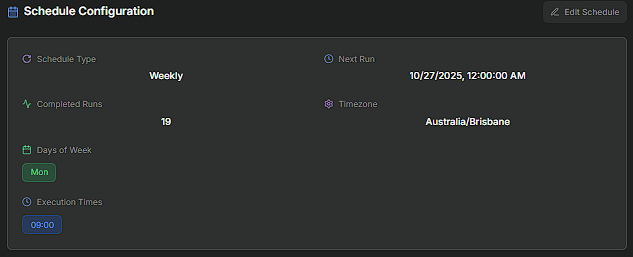
## Time Triggers (Scheduler)
Time triggers let your agent run goals on a fixed schedule — ideal for consistent routines such as daily analysis, weekly reports, or periodic rebalancing.\
They operate independently of technical triggers, ensuring execution even when market conditions are idle.
**How It Works**
* **Schedule Type** – Choose between *Recurring*, *Daily*, *Weekly*, or *Manual*.
* **Days of Week** – Pick specific days for execution.
* **Execution Times** – Add one or more times for each selected day (e.g., *09:00*).
* **Timezone** – Set the timezone to align scheduling across your agents.
Once saved, your agent will automatically execute the goal at the defined time(s), regardless of indicator or market state.
Tip: Combine time triggers with technical triggers to maintain continuous monitoring — for example, run “Market Scan” every morning at 09:00, and execute trades only when RSI or VWAP conditions are met.
***
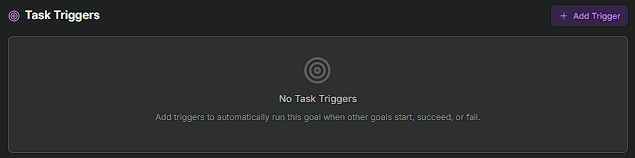
#### Task Triggers
Task triggers let one goal activate another — creating **sequential workflows** between agents or between analysis and execution stages.\
They connect goals together, so results from one process can automatically kick off the next.
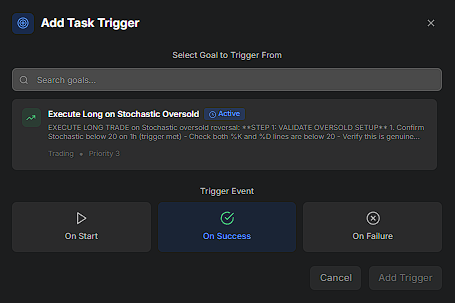
**How It Works**
* **Select Goal to Trigger From** – Choose any existing goal as the source event.
* **Trigger Event** – Define when this goal should fire:
* **On Start** – When the source goal begins.
* **On Success** – When the source goal completes successfully.
* **On Failure** – When the source goal fails or errors out.
With task triggers, Cod3x can execute multi-stage routines — from scanning markets to entering, managing, and exiting positions — entirely on autopilot.
---
# Agent Instructions
This documentation is published with GitBook. GitBook is the documentation platform designed so that both humans and AI agents can read, navigate, and reason over technical content effectively. Learn more at gitbook.com.
## Querying This Documentation
If you need additional information that is not directly available in this page, you can query the documentation by asking a question.
Perform an HTTP GET request on the following URL with the `ask` and `goal` query parameters:
```
GET https://docs.cod3x.org/terminal-overview/goals-task-management/triggers.md?ask=&goal=
```
`ask` is the immediate question: it should be specific, self-contained, and written in natural language.
`goal` is what the user is ultimately trying to achieve, the reason they need the answer. Sharing it helps GitBook give you a better, more relevant answer. A goal is most helpful when it describes the outcome the user wants rather than restating the question. For example, with `ask=how do I create an API token`, a goal like `automate deployments from our CI pipeline` lets GitBook tailor the answer to that use case.
The response will contain a direct answer to the question and relevant excerpts and sources from the documentation.
Use this mechanism when the answer is not explicitly present in the current page, you need clarification or additional context, or you want to retrieve related documentation sections.