> For the complete documentation index, see [llms.txt](https://docs.cod3x.org/llms.txt). Markdown versions of documentation pages are available by appending `.md` to page URLs; this page is available as [Markdown](https://docs.cod3x.org/terminal-overview/goals-task-management/goal-runs.md).
# Goal Runs
### Runs
Every time a goal executes—whether triggered manually, by schedule, or through automation—Cod3x logs it as a **Run**.
Runs capture the full execution lifecycle, performance metrics, tool usage, and reasoning trail behind every decision the agent makes.
***
#### Viewing All Runs
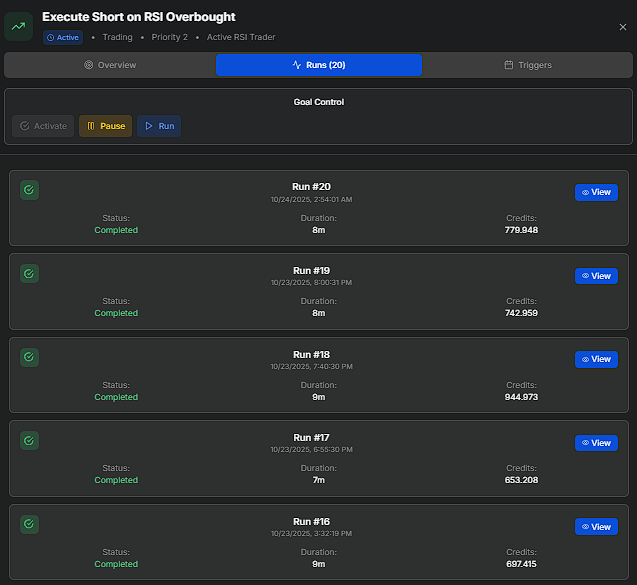
The **Runs** tab displays a chronological list of all past executions.
Each entry includes:
* **Run Number** – Sequential identifier (e.g., Run #20).
* **Status** – *Completed, Failed,* or *In Progress.*
* **Duration** – Total runtime.
* **Credits Used** – Compute credits consumed during execution.
* **Timestamp** – Exact start time in your configured timezone.
Click **View** beside any run to open its detailed breakdown.
This high-level view helps you track stability and cost efficiency over time—for instance, noticing that your “Execute Short on RSI Overbought” goal consistently completes within 8 minutes using \~750 credits.
***
#### Run Details
At the top of every run, headline metrics give you the full picture at a glance:
* **Overall Score** – How well the run achieved its goal (out of 100).
* **Success Rate** – Percentage of steps that completed successfully.
* **Execution Time** – Total runtime from start to finish.
* **Credit Usage** – Compute credits consumed.
* **Messages** – Total messages exchanged between agent, system, and tools.
* **Reasoning Steps** – Number of distinct reasoning steps the agent took.
* **Tool Calls** – How many tools were invoked.
* **Context Usage** – Percentage of the model's token window consumed.
* **Working Memory** – Data entries the agent stored during execution.
* **Iterations** – Number of full think-act-observe cycles completed.
Below that, Run Details lists status, run number, start/end times, duration, whether it was a test run, and the thread ID.
***
#### Final Reflection
The agent's final reflection is surfaced at the top of every run so you don't have to scroll through individual steps to understand what happened. This isn't just a status label — it's a comprehensive execution summary the agent writes after completing (or aborting) a run. A typical reflection includes:
* **Execution Summary** – What the goal set out to do and whether it succeeded, aborted, or failed.
* **Key Findings** – What the agent discovered during execution (e.g., missing upstream data, market conditions, confluence signals).
* **Portfolio State** – Verified account balance, open positions, pending orders, current heat, and risk capacity at time of execution.
* **Actions Taken** – Everything the agent actually did during the run: data collection, journal entries created, trades placed, orders modified.
* **Workflow Analysis** – How this run fits into the broader goal dependency chain and whether upstream goals delivered the data it needed.
* **Recommended Next Steps** – Actionable suggestions for both immediate fixes and systemic improvements.
* **Risk Assessment** – Whether the run introduced, modified, or avoided risk exposure, and why that was the correct behavior.
The reflection gives you a full debrief in one place — whether the run executed a perfect trade or correctly aborted because prerequisites weren't met.
***
#### Graph State Overview
A look under the hood of the reasoning engine:
* **Started / Last Activity** – Timestamps for run lifecycle.
* **Total Messages** – Messages exchanged during execution.
* **Waiting for Human** – Whether the agent paused for user input.
* **Context Window** – Tokens consumed out of the model's limit (e.g., 21,734 / 1,000,000).
* **Active Tools** – Every tool the agent had access to during the run (e.g., SearchJournalTool, GetHLCandleSnapshotTool, GetHLPositionsTool, CreateJournalEntryTool).
* **Credit Usage** – Broken out per-model cost.
***
#### **Reasoning Steps**
The core of every run. Each step is labeled by type and timestamped so you can trace the agent's reasoning in sequence:
* **Thought** – The agent's internal reasoning about what to do next.
* **Action** – A tool call or set of tool calls the agent decided to execute.
* **Observation** – The result of that action (e.g., "Processed 7 tool results. 7 succeeded, 0 failed.").
* **Reflection** – The agent pauses to evaluate what it's learned before deciding the next move.
In Graph of Thought mode, the agent branches into parallel reasoning paths and fires multiple tool calls simultaneously, then synthesizes observations before reflecting. Each step is expandable for full detail.
***
#### **Tool Results**
Every tool invoked during the run is listed with its execution time in milliseconds. Expand any tool to see exact inputs, outputs, and response data. If a tool returned empty data or failed, you'll see it here — this is where you debug.
***
#### **Messages**
The complete message log between the system, the agent, and its tools:
* **System** – The system prompt with agent identity, reasoning mode, wallet address, and current time.
* **Human** – The goal instruction passed to the agent.
* **AI** – Every agent response, including tool call decisions.
* **Tool** – Raw tool responses with full data payloads.
***
#### **Working Memory**
Data the agent stored during the run for reference. Each entry shows:
* **Source Tool** – Which tool generated the data.
* **Created** – When it was stored.
* **Token Size** – How much context it occupies.
* **Data** – The full payload (e.g., a journal entry recording why a scan was aborted, current portfolio state, trade details).
***
**Practical Uses**
* Audit how your agent interpreted trading logic step by step.
* Compare reasoning depth, tool usage, and credit costs across different reasoning strategies.
* Debug failed runs by tracing from Final Reflection back through the reasoning steps to the exact tool result that caused the abort.
* Verify that journal entries and working memory are capturing the right context for downstream goals.
---
# Agent Instructions
This documentation is published with GitBook. GitBook is the documentation platform designed so that both humans and AI agents can read, navigate, and reason over technical content effectively. Learn more at gitbook.com.
## Querying This Documentation
If you need additional information that is not directly available in this page, you can query the documentation by asking a question.
Perform an HTTP GET request on the following URL with the `ask` and `goal` query parameters:
```
GET https://docs.cod3x.org/terminal-overview/goals-task-management/goal-runs.md?ask=&goal=
```
`ask` is the immediate question: it should be specific, self-contained, and written in natural language.
`goal` is what the user is ultimately trying to achieve, the reason they need the answer. Sharing it helps GitBook give you a better, more relevant answer. A goal is most helpful when it describes the outcome the user wants rather than restating the question. For example, with `ask=how do I create an API token`, a goal like `automate deployments from our CI pipeline` lets GitBook tailor the answer to that use case.
The response will contain a direct answer to the question and relevant excerpts and sources from the documentation.
Use this mechanism when the answer is not explicitly present in the current page, you need clarification or additional context, or you want to retrieve related documentation sections.